


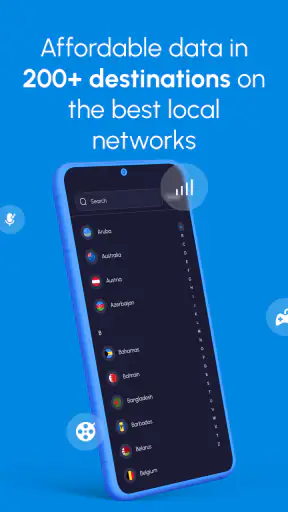
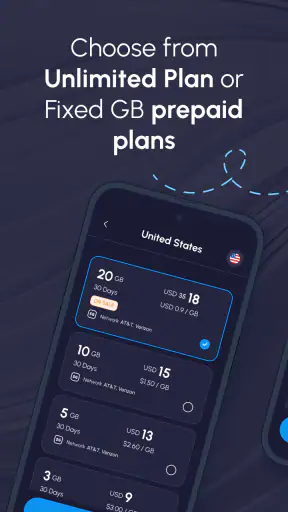
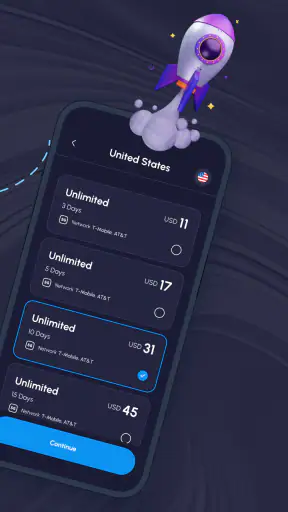
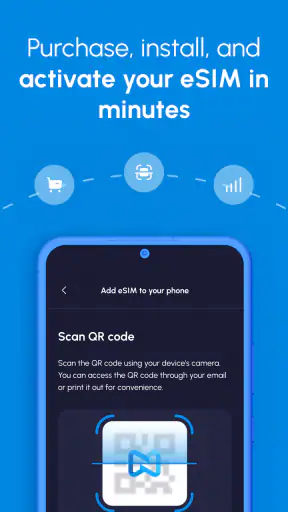
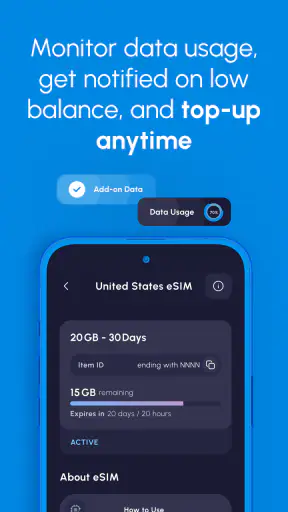


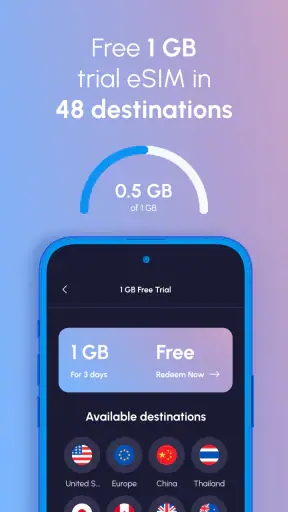
When I think about travel connectivity, the difficult part is rarely choosing a destination. It is getting online at the exact moment I need directions, a translation, a booking confirmation, or a message to the person meeting me. Nomad eSIM: Prepaid Data Plan is built for that gap. It is a free Travel & Local app from LotusFlare Inc that lets me arrange an eSIM-based data plan before or during a trip, rather than relying entirely on a physical SIM card or expensive roaming from my usual carrier.
I tested it with a practical mindset: not as a novelty, but as something I would want ready before landing somewhere unfamiliar. The experience is most useful when I treat the app as one part of a travel setup. It can help me prepare mobile data, but it cannot bypass an incompatible phone, a locked device, poor local coverage, or an incorrect system setting. That distinction matters because many apparent app problems actually begin in the phone’s network configuration.
The app has earned a 4.7 average from around 16 thousand ratings and has passed one million installs, which suggests that it has become a familiar option for travelers. Those figures do not replace personal testing, but they do make the app feel less like an experimental tool and more like an established travel utility. I would recommend it most to people who want a clear alternative to buying a physical SIM after arrival.
Where travelers usually get stuck
The first point of friction is understanding what an eSIM changes. It is not a second physical card that I can remove and inspect. It is a digital mobile profile that has to be installed on a compatible device and then selected correctly for data. If I expect the app alone to make my phone connect immediately, I am setting myself up for confusion.
Nomad eSIM: Prepaid Data Plan is an app, not a replacement for the phone’s mobile network controls. I still need to read the plan details carefully, choose the intended destination, and follow the installation instructions on the device. The app can guide the purchase and setup, but the final connection depends on the phone recognizing the eSIM and using it for mobile data.
Another common stumbling block is installing the plan too early without understanding when it should be activated. Travelers often prepare everything at home, then arrive and switch settings in a hurry. That can work, but only if I know which line is my normal number and which one is the travel data line. I prefer to label them clearly before departure and keep my regular line available for calls or messages only when I understand the possible roaming consequences.
A realistic example is a weekend arrival after a long flight. I turn off airplane mode, see that my normal line is selected for mobile data, and assume the travel plan failed. In reality, the eSIM may be installed correctly but simply not chosen as the data line. Checking that selection is more useful than repeatedly closing and reopening the app.
There is also a difference between having an eSIM installed and having usable service. A phone may show the profile but still need network selection, mobile data, or roaming-related settings adjusted according to the plan instructions. The exact labels vary between Android and iPhone, so I avoid relying on a single universal sequence. I look for the cellular or mobile-network section and verify the travel profile there.
What I check before buying or installing
I start with the phone itself. The operating-system requirement listed for this app is Android or iOS 9 or later, but that does not by itself guarantee eSIM support. Device model, regional version, and carrier lock can also matter. A phone that cannot add an eSIM will not become compatible because the app is installed, so I check the manufacturer’s specifications and the device’s network settings first.
Next, I confirm that the phone is unlocked for other networks. This is especially important for devices purchased through a carrier. An eSIM profile can be valid and correctly downloaded yet unusable if the handset restricts other network providers. This is one of the most frustrating situations because the app may appear to have done its job while the phone refuses the connection.
I also make sure I have a stable internet connection during installation. If I am setting things up at an airport with overloaded Wi-Fi, I do not rush through the process. A reliable connection at home or at the hotel is safer. I keep the app open until the installation instructions are complete and avoid deleting a profile simply because service does not appear instantly.
Before travel, I save the important plan information where I can reach it offline. I do not assume that I will always have Wi-Fi after landing. A screenshot of the instructions can be useful, although I still treat the app as the main place to manage the plan. This small preparation step prevents a common circular problem: needing internet access to find the instructions for getting internet access.
I pay attention to the destination and the plan’s intended coverage rather than choosing based only on a low price. Travel plans are most convenient when my trip fits their coverage area. Multi-country travel deserves extra care because a plan that suits one stop may not automatically be the best choice for every border crossing. If I am visiting several countries, I compare the available regional option with the possibility of separate local plans.
A calmer setup routine
My preferred workflow has three stages. First, I install the app and review the available plan information while I still have normal connectivity. Second, I install the eSIM according to the phone-specific instructions. Third, I wait until travel begins before selecting it as the primary mobile-data line, unless the instructions clearly say otherwise.
I label the lines immediately. “Home” and “Travel” are much easier to understand than generic labels that may appear in the phone’s settings. I also check which line is assigned to mobile data and whether automatic switching between lines is enabled. Automatic switching can be convenient, but I prefer predictable behavior while traveling, especially when I want to avoid accidental use of my regular line.
For messaging, I think separately about data and phone-number identity. An eSIM data plan can provide internet access, but it does not automatically turn it into my usual calling number. Apps that use an existing account may continue to work over data, while traditional calls and SMS depend on the line I select and the services supported by my carrier. Keeping that distinction in mind prevents disappointment at the airport.
Nomad eSIM: Prepaid Data Plan is free to download, which makes it easy to prepare without committing to an app fee. The actual travel plan is a separate consideration, so I read the purchase screen carefully before confirming anything. I do not treat the word “free” as meaning that mobile data itself is unlimited or costless; it refers to getting the application.
Recovering when the connection does not appear
When the data connection fails, I use a slow checklist rather than changing several settings at once. First, I confirm that the eSIM is still present in the phone’s cellular settings. Then I check that it is enabled and selected for mobile data. After that, I look at airplane mode, mobile data, and the visible network indicator. These basic checks solve more problems than reinstalling the app.
If the phone shows the travel line but no data, I restart the device after verifying the settings. A restart can help the phone register the profile and refresh its network state. I do not remove the eSIM as a first response. Deleting a digital profile can make recovery harder, particularly when I am away from Wi-Fi and cannot easily repeat the installation process.
I also check whether my phone is trying to use the wrong line. Dual-SIM devices can keep the regular line active for calls while assigning the travel eSIM to data, but the controls are not always obvious. I inspect the mobile-data selector and make sure the travel profile is the one being used. If the phone offers an option to switch data automatically, I review it rather than assuming the system will choose correctly.
Network selection can be another source of trouble. In some situations, automatic selection may take time or may not choose the expected network. If the plan instructions mention a particular network behavior, I follow those instructions. I avoid randomly selecting providers because a visible signal does not necessarily mean that the selected network is authorized for the plan.
For Android users, the exact names of settings can differ between manufacturers. For iPhone users, the arrangement is different again. I therefore use the app’s instructions together with the phone maker’s terminology. Searching the device settings for “SIM,” “mobile data,” or “cellular” is often more effective than looking for an identical menu path from another phone.
If the app itself will not load, I separate that problem from the connection problem. On Wi-Fi, I can check whether the account and plan information appear normally. If the app works on Wi-Fi but the travel line does not provide data, the issue is probably in the eSIM or network configuration rather than the application interface. If the app does not work even on a reliable Wi-Fi connection, I start with ordinary app troubleshooting: close it, reopen it, check for the current version, and restart the phone.
The current version is 10.16.1, and keeping the installed app current is sensible when preparing for a trip. I update before departure rather than waiting until I am standing at a baggage carousel. I also avoid making a major update or device change immediately before leaving if everything is already working, because unnecessary last-minute changes can create their own uncertainty.
When the app is not the cause
Sometimes the service problem is outside the app entirely. A basement, mountain road, remote island, crowded venue, or large airport can produce weak coverage even when the plan and phone are configured correctly. I test again in an open area before deciding that the eSIM has failed. A temporary lack of signal is not proof that the profile is defective.
Data can also appear unavailable because the phone is conserving battery or restricting background activity. I do not disable every battery feature automatically, but I check whether the system is limiting mobile data for the apps I actually need. Maps, translation tools, ride services, and messaging apps may each have their own data permissions and offline options.
My most useful travel habit is downloading maps and essential information before leaving Wi-Fi. That does not make the eSIM unnecessary; it gives me a fallback while the network connects or when coverage drops. I save accommodation details, transport instructions, and emergency contacts locally. Connectivity is more reliable when I do not demand that one app solve every travel problem at once.
I also remember that an eSIM data plan is not the same thing as a complete roaming solution. If I need my regular number for bank verification texts, I may keep the home line active, but I first check with my carrier how roaming is handled. If I only need internet access, I can usually keep the travel line as the data choice and limit use of the home line. The best arrangement depends on whether calls, SMS, or account verification matter more than minimizing carrier usage.
People who need a local telephone number may prefer buying a physical SIM or a local carrier plan instead. The same is true for travelers whose phones do not support eSIMs, whose devices are carrier-locked, or who want in-person help at a shop. Nomad is a better fit for someone who values digital preparation and already feels comfortable changing network settings.
Who will appreciate it most
I see the strongest use case in short trips, business travel, and multi-stop journeys where waiting in a SIM shop is inconvenient. It is also useful for travelers who want to land with a plan already prepared and use familiar messaging apps over mobile data. The app’s Everyone age rating makes it broadly accessible, although younger users may still need an adult to handle purchases and device settings responsibly.
It is less compelling for someone staying in one place for a long period and needing a local number, heavy voice calling, or a large amount of data at the lowest possible local rate. In that situation, a local physical SIM or a carrier plan may offer better value or support. I would also skip it as a primary solution if my phone’s eSIM compatibility is uncertain; confirming the handset first is essential.
Compared with ordinary carrier roaming, the appeal is control. I can separate travel data from my home line and prepare before arrival. Compared with a physical SIM, the advantage is convenience: there is no tiny card to remove, store, or lose. The trade-off is that digital setup requires more attention. A shop employee cannot rescue me if I choose the wrong data line or discover that my phone is locked.
Compared with free public Wi-Fi, an eSIM gives me more flexibility while walking between locations or using transport apps outdoors. Public Wi-Fi can still be useful, but I do not want to depend on unknown networks for maps, account access, or private messages. I use Wi-Fi to reduce data use, not as my only connection.
My practical verdict after using the workflow
Nomad eSIM: Prepaid Data Plan is a convincing travel utility when I prepare the phone as carefully as I prepare the plan. Its greatest strength is not that it eliminates every connectivity issue; it is that it gives me a practical way to arrange travel data without handling a physical SIM. The experience becomes straightforward once I understand the division of responsibility between the app, the eSIM profile, the phone’s settings, and the local network.
LotusFlare Inc has positioned it as a simple way to get connected worldwide, and I think that description works best when read as a starting point rather than a guarantee of instant service everywhere. I still need a compatible, unlocked device, a stable installation connection, and sensible backup preparation. Those requirements are not unique to this app, but they are easy to overlook when I am focused on the destination.
The app was released on September 30, 2022, and its continued presence, current version 10.16.1, and broad adoption make it a reasonable option to investigate before a trip. I like that it is free to install and focused on a clear travel need. I do not like the possibility of confusion around activation, line selection, and troubleshooting, especially for someone who has never used an eSIM.
My recommendation is simple: install it while you still have dependable Wi-Fi, verify eSIM and carrier-lock compatibility, label the travel line, save essential instructions offline, and test the data selection before relying on it. If you follow that routine, it can be a convenient alternative to carrier roaming, airport SIM purchases, and constant searches for public Wi-Fi. If you want a local phone number, in-person assistance, or a solution that requires no network-setting decisions, a traditional local SIM or carrier option will probably suit you better.
My bottom line: this is a good choice for prepared travelers who want flexible mobile data and are willing to spend a few minutes checking their phone. It is not magic, but used with the right setup habits, it can remove one of the most annoying uncertainties from arriving in a new country.


